WordPress Gets Built-in AI Assistant for Editing, Styling, and Image Creation

Automattic has rolled out an exciting new AI assistant directly into WordPress.com, making it easier than ever to tweak your site’s design and content without leaving the editor. This tool understands your page’s existing layout and text, so you can simply describe what you want in everyday language and watch the changes happen in real time. Whether you run a personal blog or manage a business site, the assistant acts like a helpful collaborator right inside the familiar WordPress environment.
One of the standout features lets you adjust layouts, styles, colors, fonts, and overall patterns with simple commands. You might say something like make this section feel more modern and open or brighten up the entire page’s color scheme, and the AI applies those updates instantly. It goes further by adding new elements on request, such as inserting a contact page or placing a testimonials section right where you need it. These capabilities work best with block themes, where the assistant integrates smoothly into the site editor sidebar for seamless modifications.
Content creation and refinement get a major boost too. The AI can rewrite sections to adjust tone, like making a biography sound more assertive, or translate parts into different languages while keeping the meaning intact. It also suggests headlines, checks facts, catches grammar issues, and offers editing tips to polish your writing. In the notes feature introduced with WordPress 6.9, you can tag the assistant by typing @ai followed by your request, turning collaborative editing into a conversation with smart suggestions and even external references when helpful.
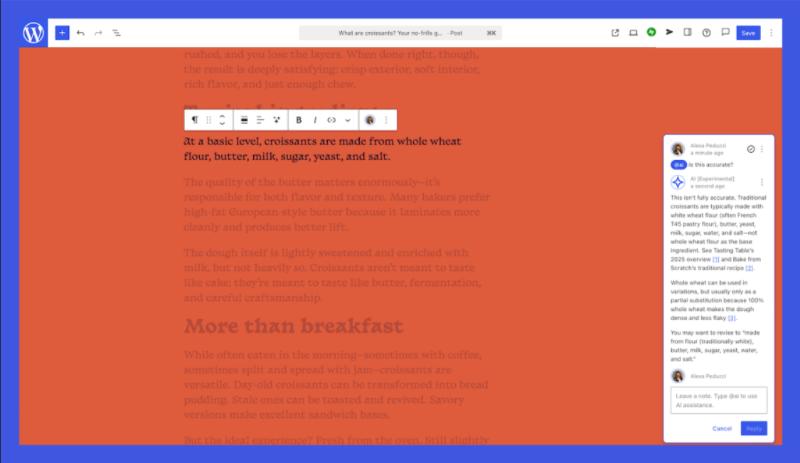
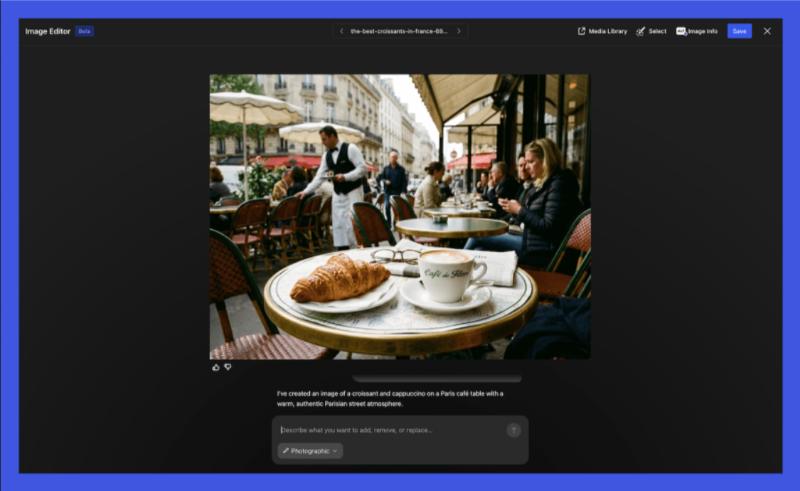
Image handling takes things to another level with built-in generation and editing powered by Google’s Gemini Nano Banana models. A new Generate image button appears in the Media Library, where you describe what you need, including specific aspect ratios or artistic styles, and the AI creates fresh visuals or refines ones you already have. This keeps everything consistent with your site’s branding without relying on outside tools, saving time and effort for anyone who wants professional-looking media fast.
The assistant remains optional, so you control when to use it. Head to your site’s settings, find the AI tools section, and toggle it on to start experimenting. Sites built with WordPress.com’s earlier AI website builder already have it enabled by default. Since it focuses on natural language interaction and real-time previews, even beginners can achieve sophisticated results that once required coding skills or multiple plugins.
This update reflects how WordPress continues evolving to simplify powerful web creation. With these AI capabilities now embedded in the platform, managing and enhancing a site feels more intuitive and creative than before.
What do you think about using AI directly in your WordPress editor for design and content tasks, share your thoughts in the comments.