GlideX Represents A Practical Solution For Connecting Screens And Managing Smart Devices

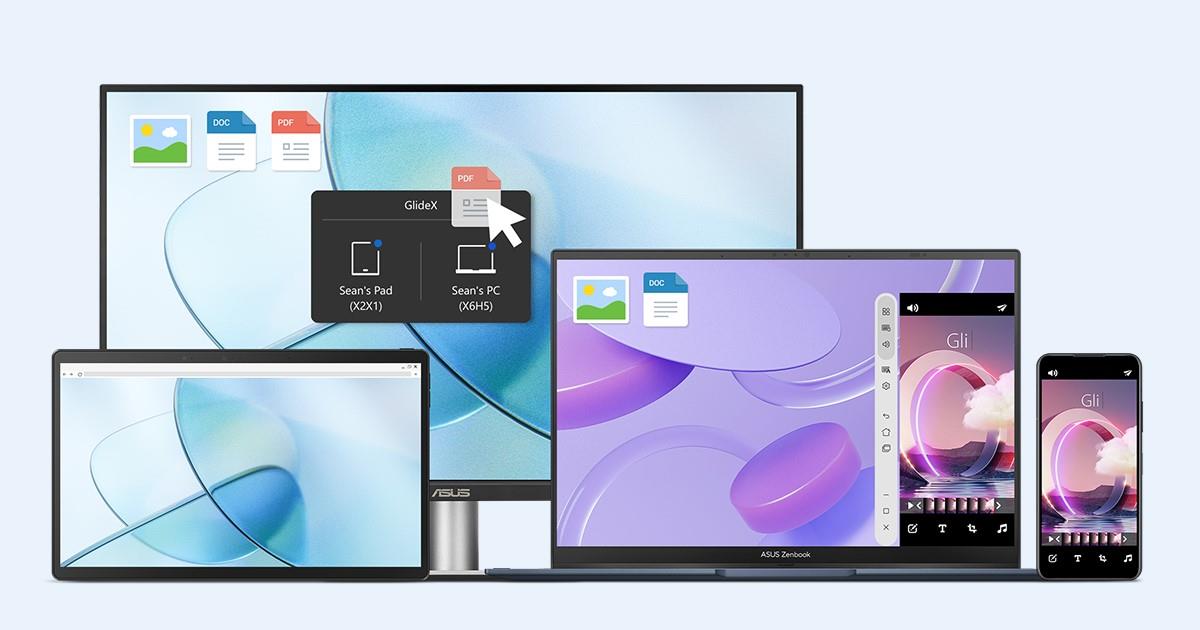
We have recently explored a software solution designed to bridge the widening gap between personal computers and mobile devices. The application is known as GlideX and it serves as a comprehensive cross-platform tool for screen sharing and device control. It addresses the common frustration of fragmented ecosystems by allowing Windows computers to connect seamlessly with Android and iOS gadgets. The software is versatile enough to function on various hardware brands and is not limited strictly to Asus products. This makes it an accessible option for anyone looking to unify their digital workspace without replacing their existing hardware.
One of the most valuable features highlighted in the analysis is the Screen Extend mode which turns a tablet into a secondary monitor. This capability effectively expands the desktop environment without the need for purchasing expensive portable displays or additional cabling. Users can simply drag windows and applications from their main computer screen onto their connected mobile device. It creates a dual-monitor setup that is highly portable and perfect for professionals who frequently work in coffee shops or while traveling. The transition is smooth and mimics the behavior of a traditional wired monitor setup.
The software also offers a mirroring function that projects the screen of a smartphone directly onto the computer display. This feature is particularly beneficial for viewing content from a phone on a much larger canvas or for demonstrating mobile apps during a meeting. It helps keep the user focused on a single screen rather than constantly switching attention between a handset and a computer monitor. Notifications and mobile-specific activities become easier to manage when they are integrated into the primary desktop view. This integration significantly reduces the distractions caused by juggling multiple physical devices.
A standout capability known as Unify Control allows users to operate multiple devices with a single set of peripherals. A mouse and keyboard connected to the PC can seamlessly control the interface of the linked smartphone or tablet. The cursor moves across the boundary of the computer screen and appears on the mobile device instantly to allow for typing and clicking. This function eliminates the physical friction of moving hands between different input devices while multitasking. It functions similarly to a software-based KVM switch but without the clutter of extra hardware.
Beyond display management the application includes utilities such as file transfer and camera sharing. Users can drag and drop files between their computer and mobile device to bypass the cumbersome process of emailing documents to oneself. The Shared Cam feature allows the high-quality camera on a smartphone to function as a webcam for video calls on the PC. This is a significant upgrade over the standard low-resolution webcams found on many laptops. These added utilities make the application a robust suite for enhancing general productivity.
Connections between devices can be established wirelessly through a local Wi-Fi network or via a wired USB cable for better stability. While the wireless option offers convenience it is often more susceptible to lag compared to the wired approach. Using a USB cable generally results in a smoother experience with higher graphical quality and lower latency. The application manages to maintain a reliable link that supports workflow rather than hindering it with connection drops. Users can choose the connection method that best suits their immediate environment and cable availability.
The application is free to download but the basic version includes advertisements and some limitations on video quality. Users who want a cleaner experience can opt for subscription packages that remove ads and unlock higher resolutions. These premium tiers also offer higher refresh rates for smoother visual performance during streaming or gaming sessions. The flexibility in pricing makes it accessible for casual users while offering advanced features for power users who need professional performance.
This tool represents a significant step toward a unified digital experience for users who rely on multiple devices. It provides a software-based alternative to hardware solutions that often cost significantly more money. By leveraging devices that users already own it offers a cost-effective way to boost productivity and streamline daily tasks. The interface is designed to be intuitive so that setting up a connection does not require extensive technical knowledge.
Please let us know if you would use your tablet as a second monitor for your work setup in the comments.